
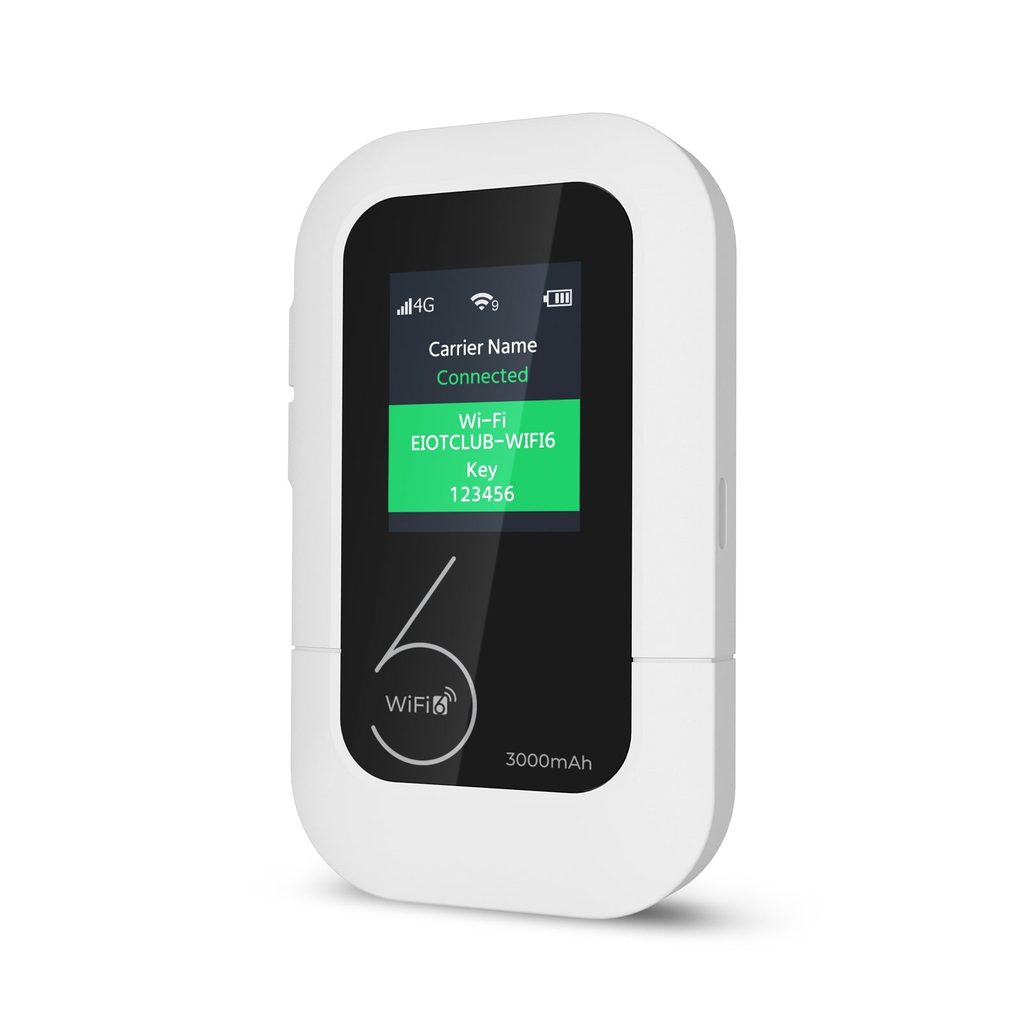
For years, home internet meant a technician visit, a long-term contract, and a router bolted to the living room wall. That model still suits many households, but it does not fit everyone. Renters who move every year, students in shared housing, weekend cabin owners, and travelers who spend weeks away from home often end up paying for broadband they barely use, or struggling without a connection while they wait for installation.
A portable, pay-as-you-go hotspot offers a different approach. You buy the device, add a data plan when you need it, and take the connection wherever you go. This article looks at when that approach makes more sense than fixed broadband, when it does not, and how to get the most out of a hotspot for both home and travel. It is written for people weighing a practical decision, not for tech enthusiasts, so the focus stays on real situations and clear steps rather than specifications.
Where Traditional Broadband Falls Short
Fixed broadband works well when you stay in one place for years and use a lot of data every day. The trouble starts when life does not follow that pattern. Contracts often lock you in for a year or more, with early termination fees if you move. Installation appointments can take days or weeks to schedule. In rural areas and older buildings, the available options may be slow or unreliable regardless of the price.
There is also the question of paying for idle time. A holiday cabin used a few weekends a year, or an apartment left empty during a long work assignment, still generates a monthly bill. For households that only need internet part of the time, that fixed cost can feel hard to justify.
What a Prepaid Hotspot Does Differently
A prepaid mobile hotspot connects to a cellular network and shares that connection over Wi-Fi with your laptop, phone, tablet, or smart TV. Because it runs on a prepaid data plan, there is no long contract and no credit check. You pay for data when you need it, and you can pause when you do not.
The device is also portable. The same hotspot that powers a student’s dorm room during the semester can travel home for the holidays, go on a road trip, or serve as a backup when the main broadband fails. That flexibility is the core reason people choose it over a fixed line.
The Honest Trade-Offs
A hotspot is not a perfect replacement for every home. Speeds depend on local cellular coverage and can slow in crowded areas at peak times. Households that stream in high definition on several screens every night, or download large game files regularly, may find data costs add up faster than a flat-rate broadband plan. The best fit is moderate usage, frequent moves, or part-time occupancy.
Situations Where a Hotspot Makes the Most Sense
Some living and travel situations line up especially well with prepaid, portable internet. If one of these describes you, a hotspot is worth serious consideration.
- Renters and students who move often and want to avoid installation fees and contracts.
- Owners of vacation homes, cabins, or RVs that are occupied only part of the year.
- Remote workers who need a reliable backup when home broadband goes down during important calls.
Travelers also benefit. Rather than trusting hotel or café Wi-Fi, which can be slow and less secure, a personal hotspot gives you a private network wherever you set it down. Families on road trips can connect several devices at once without each person needing their own data plan.
Setting Up a Hotspot for Home Use
Getting started takes less time than scheduling a broadband installation. Charge the device fully, insert the SIM card if one is not preinstalled, and power it on. Connect a laptop or phone to the Wi-Fi network name printed on the device label, then open the admin page or companion app to finish setup. Change the default Wi-Fi name and password right away so neighbors cannot join.
Placement matters more than most people expect. Cellular signals are strongest near windows and on higher floors. Try a few spots and check signal bars in the app before settling on one. Keeping the hotspot plugged in at home avoids battery drain and lets it run steadily through the day. Manufacturers such as Eiotclub include quick-start guides that walk through these first steps in order.
Managing Data on a Prepaid Plan
Because you pay for what you use, a few habits keep costs predictable. Set streaming apps to standard definition unless you are watching on a large screen. Mark the hotspot network as metered on Windows and macOS so large updates wait for another connection. Check your balance in the app every week at first, until you understand your household’s usual pattern.
Taking the Hotspot on the Road
One of the main advantages of a portable device is that the same connection travels with you. Before a trip, confirm your data plan covers the areas you are visiting and top it up if needed. Pack a charging cable and a small power bank, since hotspot batteries drain faster when many devices are connected or signal is weak.
In a car or RV, place the hotspot near a window rather than in a glove box or under a seat. In hotels, put it on a windowsill or desk rather than inside a bag. If you are sharing the connection with travel companions, ask everyone to disable automatic app updates and photo backups while on the road, which prevents one device from quietly using most of the data.
Using a Hotspot as a Broadband Backup
Even households that keep a fixed internet line can get real value from a portable hotspot. Broadband outages happen for many reasons: a storm damages a line, construction crews cut a cable, or a provider runs maintenance overnight that stretches into the morning. For anyone working from home, an outage during a client presentation or a deadline is more than an inconvenience.
A hotspot kept charged in a drawer turns those moments into a short interruption rather than a lost workday. When the main connection drops, power on the hotspot, connect your work laptop, and carry on. Because the plan is prepaid, you are not paying a second monthly bill for a connection you rarely use. You simply top up when an outage occurs or keep a small balance ready.
Making the Switch Quick
Preparation is what makes a backup useful. Save the hotspot’s Wi-Fi network on every device that matters, so they connect without typing a password in a hurry. Test the hotspot once a month by switching a laptop over for a few minutes, which confirms the battery holds a charge and the data plan is still active. Keep the charging cable with the device so it is ready to plug in.
It also helps to decide in advance which devices get priority. During an outage, connect the work laptop and your phone first. Leave smart TVs, game consoles, and tablets offline until the main broadband returns, since they can use a large share of the data on streaming and updates.
Keeping Children and Guests Connected Safely
When several people share a hotspot, basic controls keep things fair and safe. Many hotspot apps show connected devices and let you block unknown ones or limit how many can join. Some also let you set up a separate guest network, which keeps visitors away from your personal devices. For younger children, combine the hotspot with the parental controls built into their tablets or phones, since those settings apply regardless of which network they use.
Choosing Flexible Internet on Your Own Terms
Fixed broadband still makes sense for households that stay put and use large amounts of data every day. For everyone else, including renters, students, part-time homeowners, and frequent travelers, a prepaid hotspot often fits real life better. It avoids contracts and installation waits, costs nothing when you are not using it, and moves with you from apartment to cabin to road trip.
The key is matching the tool to your habits. Estimate how much data you actually use, place the device where the signal is strongest, secure the Wi-Fi network, and keep an eye on your balance in the first few weeks. With those basics covered, a hotspot can serve as your main connection, a dependable backup, or a travel companion, depending on what you need at the time.